今までインフラはずっとDocker Compose止まりだったのですが、無職期間を利用してk8s(クバネティス)を触ってみることにしました
実行環境は以下のとおりです
・MacBookPro 2019(Intel Mac)
Docker Composeとの違い
k8sもコンテナ管理ツールですが、自分が今メインで利用している「Docker Composeと何が違うのか」を最初に理解しておきたいと思います
Docker Compose:1台のマシンの中で複数のコンテナを管理するためのツール
k8s:複数台のマシン(ノード)を跨いで、コンテナを管理するためのツール
が大きな違いのようです
Docker Composeでは1台のマシン内で完結するため、最悪マシンごと落ちたら推しましですが、
k8sは複数マシンに跨いでコンテナを管理できるため、万が一1台のマシンが落ちてもサービスを継続することができます
他、k8sが持つ気になる機能として
・HPA(Horizontal Pod Autoscaler):アクセス数が増えてきたら自動でPodを増やすオートスケール機能
・ローリングアップデート / ロールバック:ローリングアップデートを行うための機能がデフォルトで用意されている
この辺りの機能は個人開発アプリでも十分に恩恵を受けられそうです
まずは環境構築
今回は「kind(Kubernetes in Docker)」を利用して環境を構築します
Dockerがインストールされていることが前提で、それ以外のセットアップは下記の通り行いました
kindのインストール
brew install kindインストール後のバージョン確認
kind version
↓
kind v0.33.0 go1.27.0 darwin/amd64
早速クラスターを作ってみる
以下のコマンドでクラスターが作成されます
kind create cluster --name study
↓
Creating cluster "study" ...
 ✓ Ensuring node image (kindest/node:v1.37.0) 🖼️
 ✓ Preparing nodes 📦
 ✓ Writing configuration 📜
 ✓ Starting control-plane 🕹️
 ✓ Installing CNI 🔌
 ✓ Installing StorageClass 💾
Set kubectl context to "kind-study"
You can now use your cluster with:

kubectl cluster-info --context kind-study

Thanks for using kind! 😊
以下のコマンドで作成したクラスターの情報が閲覧できます
kubectl cluster-info --context kind-study
↓
Kubernetes control plane is running at https://127.0.0.1:57690
CoreDNS is running at https://127.0.0.1:57690/api/v1/namespaces/kube-system/services/kube-dns:dns/proxy

To further debug and diagnose cluster problems, use 'kubectl cluster-info dump'.
Node(実行環境)一覧を表示
kubectl get nodes
↓
NAME                  STATUS   ROLES           AGE    VERSION
study-control-plane   Ready    control-plane   4m6s   v1.37.0
全Podを表示するにはこちらのコマンドを利用します
kubectl get pods -A
↓
NAMESPACE            NAME                                          READY   STATUS    RESTARTS   AGE
kube-system          coredns-559f6c778d-d8txz                      1/1     Running   0          5m55s
kube-system          coredns-559f6c778d-n79ln                      1/1     Running   0          5m55s
kube-system          etcd-study-control-plane                      1/1     Running   0          6m3s
kube-system          kindnet-v2z9q                                 1/1     Running   0          5m55s
kube-system          kube-apiserver-study-control-plane            1/1     Running   0          6m3s
kube-system          kube-controller-manager-study-control-plane   1/1     Running   0          6m3s
kube-system          kube-proxy-p7qb4                              1/1     Running   0          5m55s
kube-system          kube-scheduler-study-control-plane            1/1     Running   0          6m3s
local-path-storage   local-path-provisioner-75f7fc7dc5-6mlb9       1/1     Running   0          5m55s
Podを配置してみる
実際にPodを配置して、nginx初期画面を表示させてみます
まずはnginxのイメージを利用してpodを作成します
kubectl run nginx --image=nginx
↓
pod/nginx created
Podの状態を確認します
kubectl get pods
↓
NAME    READY   STATUS    RESTARTS   AGE
nginx   1/1     Running   0          83s

より詳しい情報を見る
kubectl describe pod nginx
↓
Name:             nginx
Namespace:        default
Priority:         0
Service Account:  default
Node:             study-control-plane/172.19.0.2
Start Time:       Wed, 02 Sep 2026 10:46:34 +0900
Labels:           run=nginx
Annotations:      <none>
Status:           Running
IP:               10.244.0.5
IPs:
  IP:  10.244.0.5
Containers:
  nginx:
    Container ID:   containerd://e7921ffe7728e479ab0cd4fcc004e3b98bfb8537289a535942d25d2920ad8967
    Image:          nginx
    Image ID:       docker.io/library/nginx@sha256:b34848eff6db786b6b1282d3a9c3fd0b5563dfb6d261df4923378b419e0d24f0
    Port:           <none>
    Host Port:      <none>
    State:          Running
      Started:      Wed, 02 Sep 2026 10:46:44 +0900
    Ready:          True
    Restart Count:  0
    Environment:    <none>
    Mounts:
      /var/run/secrets/kubernetes.io/serviceaccount from kube-api-access-r6x7t (ro)
Conditions:
  Type                        Status
  PodReadyToStartContainers   True
  Initialized                 True
  Ready                       True
  ContainersReady             True
  PodScheduled                True
Volumes:
  kube-api-access-r6x7t:
    Type:                    Projected (a volume that contains injected data from multiple sources)
    TokenExpirationSeconds:  3607
    ConfigMapName:           kube-root-ca.crt
    Optional:                false
    DownwardAPI:             true
QoS Class:                   BestEffort
Node-Selectors:              <none>
Tolerations:                 node.kubernetes.io/not-ready:NoExecute op=Exists for 300s
                             node.kubernetes.io/unreachable:NoExecute op=Exists for 300s
Events:
  Type    Reason     Age    From               Message
  ----    ------     ----   ----               -------
  Normal  Scheduled  2m26s  default-scheduler  Successfully assigned default/nginx to study-control-plane
  Normal  Pulling    2m26s  kubelet            spec.containers{nginx}: Pulling image "nginx"
  Normal  Pulled     2m16s  kubelet            spec.containers{nginx}: Successfully pulled image "nginx" in 9.876s (9.877s including waiting). Image size: 63348835 bytes.
  Normal  Created    2m16s  kubelet            spec.containers{nginx}: Container created
  Normal  Started    2m16s  kubelet            spec.containers{nginx}: Container started
Podのログを見るには以下のコマンドを利用します
kubectl logs nginx
↓
/docker-entrypoint.sh: /docker-entrypoint.d/ is not empty, will attempt to perform configuration
/docker-entrypoint.sh: Looking for shell scripts in /docker-entrypoint.d/
/docker-entrypoint.sh: Launching /docker-entrypoint.d/10-listen-on-ipv6-by-default.sh
10-listen-on-ipv6-by-default.sh: info: Getting the checksum of /etc/nginx/conf.d/default.conf
10-listen-on-ipv6-by-default.sh: info: Enabled listen on IPv6 in /etc/nginx/conf.d/default.conf
/docker-entrypoint.sh: Sourcing /docker-entrypoint.d/15-local-resolvers.envsh
/docker-entrypoint.sh: Launching /docker-entrypoint.d/20-envsubst-on-templates.sh
/docker-entrypoint.sh: Launching /docker-entrypoint.d/30-tune-worker-processes.sh
/docker-entrypoint.sh: Configuration complete; ready for start up
2026/09/02 01:46:44 [notice] 1#1: using the "epoll" event method
2026/09/02 01:46:44 [notice] 1#1: nginx/1.31.4
2026/09/02 01:46:44 [notice] 1#1: built by gcc 14.2.0 (Debian 14.2.0-19)
2026/09/02 01:46:44 [notice] 1#1: OS: Linux 7.0.12-linuxkit
2026/09/02 01:46:44 [notice] 1#1: getrlimit(RLIMIT_NOFILE): 1073741816:1073741816
2026/09/02 01:46:44 [notice] 1#1: start worker processes
2026/09/02 01:46:44 [notice] 1#1: start worker process 33
2026/09/02 01:46:44 [notice] 1#1: start worker process 34
2026/09/02 01:46:44 [notice] 1#1: start worker process 35
2026/09/02 01:46:44 [notice] 1#1: start worker process 36
2026/09/02 01:46:44 [notice] 1#1: start worker process 37
2026/09/02 01:46:44 [notice] 1#1: start worker process 38
2026/09/02 01:46:44 [notice] 1#1: start worker process 39
2026/09/02 01:46:44 [notice] 1#1: start worker process 40
2026/09/02 01:46:44 [notice] 1#1: start worker process 41
2026/09/02 01:46:44 [notice] 1#1: start worker process 42
2026/09/02 01:46:44 [notice] 1#1: start worker process 43
2026/09/02 01:46:44 [notice] 1#1: start worker process 44
現在の設定ではクラスタ内部用のIPしか設定されていないため直接アクセスができない
Docker Composeと同じ用にポートフォワードを設定して外部からアクセスできるようにします
kubectl port-forward pod/nginx 8080:80
↓
Forwarding from 127.0.0.1:8080 -> 80
Forwarding from [::1]:8080 -> 80
コマンド自体はフォアグラウンドで起動するため、バックグランドで起動するか、もう一つターミナルを立ち上げて実行するのが良さそうです
上記コマンド実行後、ブラウザの8080にアクセスします
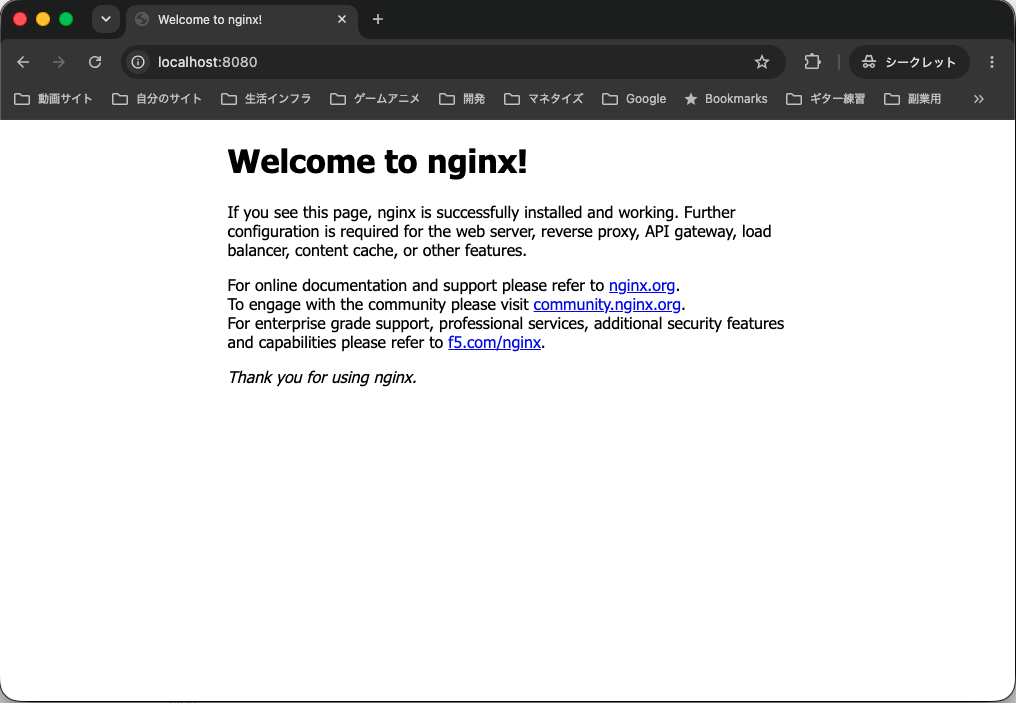
無事にウェルカムページが表示されました!
もう一度、nginxのログを確認してみます
kubectl logs nginx
↓
34#34: *2 open() "/usr/share/nginx/html/tools" failed (2: No such file or directory), client: 127.0.0.1, server: localhost, request: "GET /tools HTTP/1.1", host: "localhost:8080", referrer: "http://localhost:8080/"
127.0.0.1 - - [02/Sep/2026:01:58:42 +0000] "GET /tools HTTP/1.1" 404 555 "http://localhost:8080/" "Mozilla/5.0 (Macintosh; Intel Mac OS X 10_15_7) AppleWebKit/537.36 (KHTML, like Gecko) Chrome/152.0.0.0 Safari/537.36" "-"
127.0.0.1 - - [02/Sep/2026:01:58:43 +0000] "GET /build.json HTTP/1.1" 404 555 "http://localhost:8080/" "Mozilla/5.0 (Macintosh; Intel Mac OS X 10_15_7) AppleWebKit/537.36 (KHTML, like Gecko) Chrome/152.0.0.0 Safari/537.36" "-"
2026/09/02 01:58:43 [error] 35#35: *3 open() "/usr/share/nginx/html/build.json" failed (2: No such file or directory), client: 127.0.0.1, server: localhost, request: "GET /build.json HTTP/1.1", host: "localhost:8080", referrer: "http://localhost:8080/"
2026/09/02 01:58:43 [error] 35#35: *3 open() "/usr/share/nginx/html/props" failed (2: No such file or directory), client: 127.0.0.1, server: localhost, request: "GET /props?autoload=false HTTP/1.1", host: "localhost:8080", referrer: "http://localhost:8080/"
127.0.0.1 - - [02/Sep/2026:01:58:43 +0000] "GET /props?autoload=false HTTP/1.1" 404 555 "http://localhost:8080/" "Mozilla/5.0 (Macintosh; Intel Mac OS X 10_15_7) AppleWebKit/537.36 (KHTML, like Gecko) Chrome/152.0.0.0 Safari/537.36" "-"
2026/09/02 01:58:43 [error] 35#35: *3 open() "/usr/share/nginx/html/v1/models" failed (2: No such file or directory), client: 127.0.0.1, server: localhost, request: "GET /v1/models HTTP/1.1", host: "localhost:8080", referrer: "http://localhost:8080/"
127.0.0.1 - - [02/Sep/2026:01:58:43 +0000] "GET /v1/models HTTP/1.1" 404 555 "http://localhost:8080/" "Mozilla/5.0 (Macintosh; Intel Mac OS X 10_15_7) AppleWebKit/537.36 (KHTML, like Gecko) Chrome/152.0.0.0 Safari/537.36" "-"
127.0.0.1 - - [02/Sep/2026:01:58:45 +0000] "GET /sw.js HTTP/1.1" 404 555 "http://localhost:8080/sw.js" "Mozilla/5.0 (Macintosh; Intel Mac OS X 10_15_7) AppleWebKit/537.36 (KHTML, like Gecko) Chrome/152.0.0.0 Safari/537.36" "-"
2026/09/02 01:58:45 [error] 35#35: *3 open() "/usr/share/nginx/html/sw.js" failed (2: No such file or directory), client: 127.0.0.1, server: localhost, request: "GET /sw.js HTTP/1.1", host: "localhost:8080", referrer: "http://localhost:8080/sw.js"
127.0.0.1 - - [02/Sep/2026:01:59:05 +0000] "GET / HTTP/1.1" 200 896 "-" "Mozilla/5.0 (Macintosh; Intel Mac OS X 10_15_7) AppleWebKit/537.36 (KHTML, like Gecko) Chrome/152.0.0.0 Safari/537.36" "-"
2026/09/02 01:59:05 [error] 36#36: *4 open() "/usr/share/nginx/html/favicon.ico" failed (2: No such file or directory), client: 127.0.0.1, server: localhost, request: "GET /favicon.ico HTTP/1.1", host: "localhost:8080", referrer: "http://localhost:8080/"
127.0.0.1 - - [02/Sep/2026:01:59:05 +0000] "GET /favicon.ico HTTP/1.1" 404 555 "http://localhost:8080/" "Mozilla/5.0 (Macintosh; Intel Mac OS X 10_15_7) AppleWebKit/537.36 (KHTML, like Gecko) Chrome/152.0.0.0 Safari/537.36" "-"
サイトにアクセスした形跡が残っていますね!
Podの削除
kubectl delete pod nginx
↓
pod "nginx" deleted from default namespace
Podが消えたのか確認
kubectl get pods
↓
No resources found in default namespace.
以上でPodの削除も完了です
Claudeさんからのアドバイス
Podは基本的に使い捨て
kubectl runコマンドで作成したPodは使い捨てで、消したら同じものは二度と戻ってこない
実運用ではDeploymentを使う(今後学習)
port-forwardは開発時の確認用
きちんとしたアクセス設定はServiceを利用する(今後学習予定)
describeとlogsの使い分け
describe:Podsが起動しないときの原因調査用(Eventsを確認する)
logs:Pods起動後に何が起きているかの確認用(アクセスやアプリケーションエラーなど)
以上
ということで、k8s入門ということで環境設定からnginx起動までをやってみました
今後はDeploymentやServiceと言った、より本番運用に役立てられるような部分を勉強していきたいです